AI-Generated 3D Game Assets and Import Pipelines Into Godot
GLB keeps AI assets intact from generator to Godot engine.
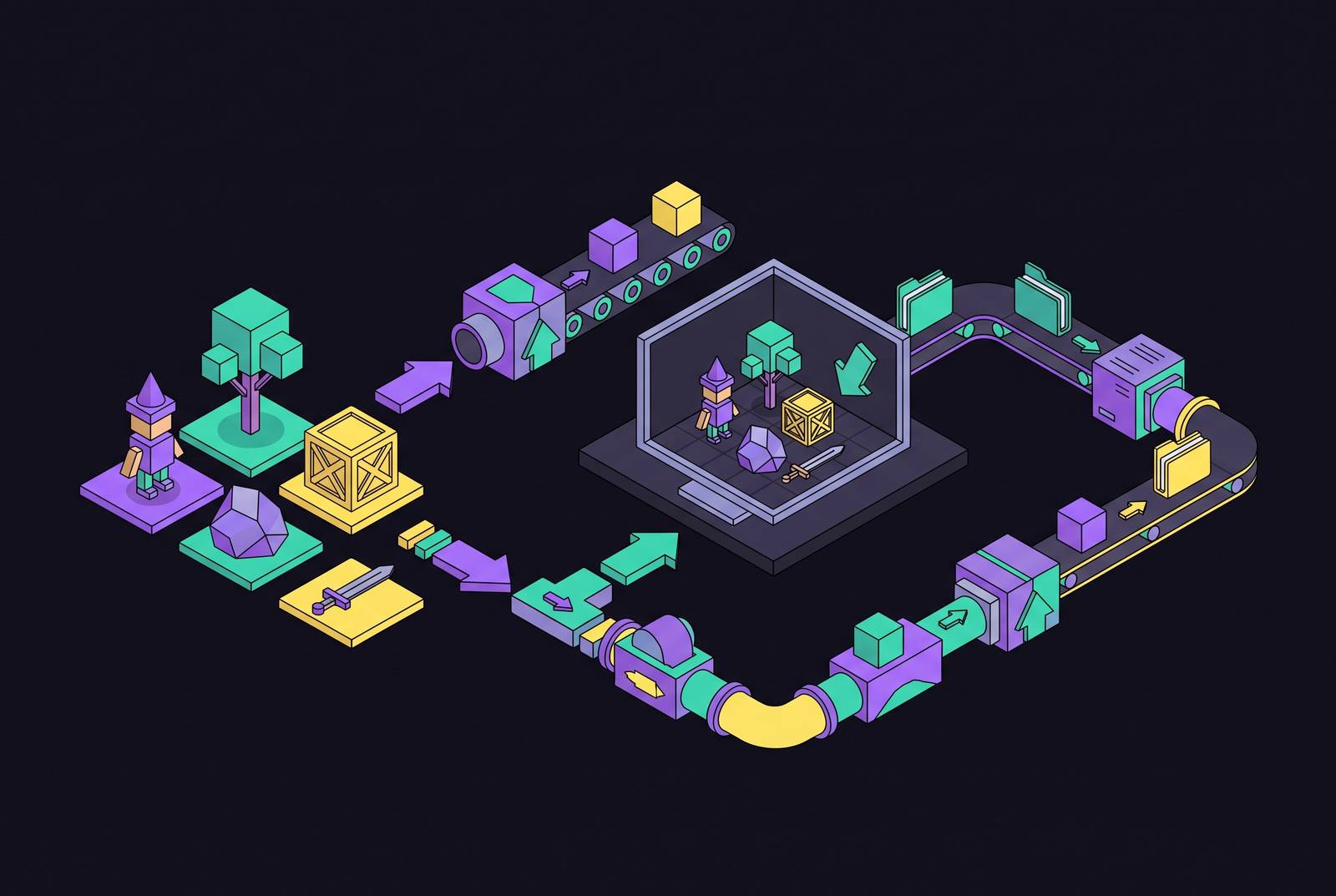
AI-generated 3D assets reach Godot cleanly when they use GLB from generation onward and each stage gives the next stage what it needs. The format carries the asset, but it does not make the asset game-ready. A reliable workflow fixes topology, scale, materials, collision, and animation at the stage that can actually resolve them.
Why glTF/GLB is the connective tissue of the AI-to-Godot pipeline
glTF 2.0 is Godot's recommended scene format, and GLB is its binary packaging. It can carry geometry, PBR materials, textures, skeletons, and animation clips in a single file that Godot reads natively without manual remapping. Keeping referenced data together avoids the need for generated textures to rely on external paths. If those paths drift, the dependencies can break on import. GLB removes that source of fragility by keeping the data inside the file.
The alternatives have costs that matter before export. OBJ carries no skeleton, animation, or PBR materials. FBX is supported, with Godot 4.3 and later using ufbx by default for newly added FBX files, but its proprietary format makes round-tripping from AI generators less predictable. Ludo.ai and Meshy both export GLB with PBR textures as their primary game-engine format. Choose GLB at the generator rather than treating it as a conversion task at the end.
What the six-stage pipeline actually covers — and where it glosses over the hard parts
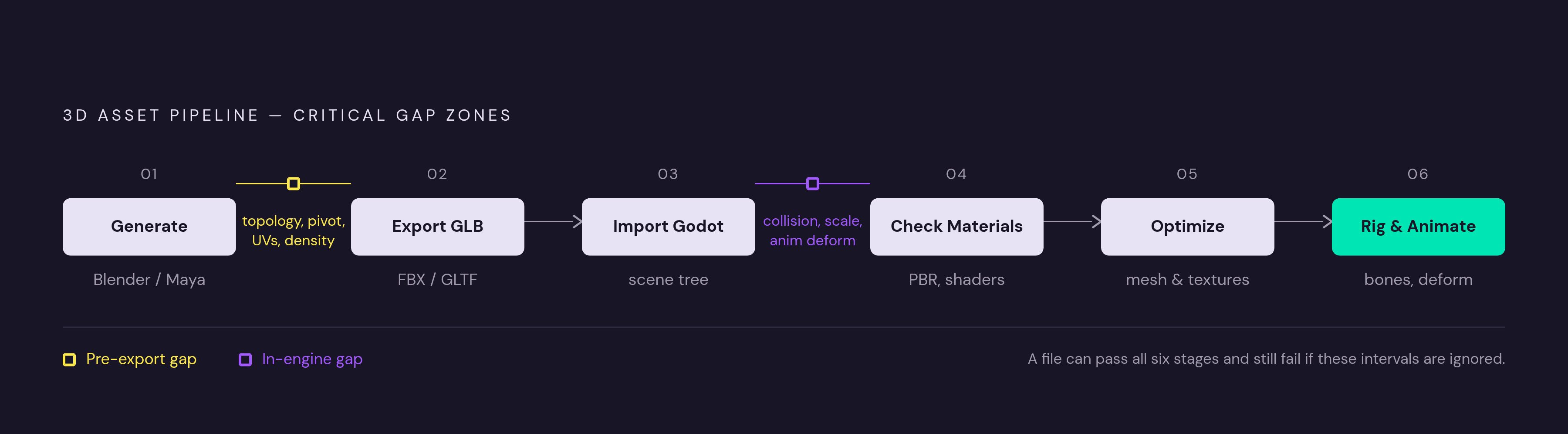
The standard workflow has six stages, which are generate, export as GLB, import into Godot, check materials, optimize mesh and textures, and add rigging/animation. This is a useful reference map because it separates asset creation from engine integration. It is not a complete account of the work between those stages. A file can go through every step and still have flaws that stop it from doing its job.
The first gap is between generation and export, where topology, pivot position, and UVs shape what the engine gets. A high-detail generation mode can also create more geometry than the real-time scene needs, increasing work downstream. The second gap is between import and gameplay, where collision, scale, and animation deformation affect how the asset works. Successful import says that Godot can read the asset.
The intermediate checks also have limits. Materials can arrive without manual remapping only when the export includes textures and valid UVs. Automatic LOD generation addresses distant views while leaving defects in the closest view unchanged. Rigging and animation then introduce requirements that a static mesh never had to satisfy.
What to fix at the generation and export stage before the file ever reaches Godot
AI generators infer geometry from text or image prompts and produce a standard mesh, but that mesh is not production-clean by default. Raw output can have floating geometry, internal faces, mesh holes, and incorrect normals. Topology, UV layout, and polygon density belong in the generation-to-export review, before the GLB is written. A readable file is not evidence of sound geometry.
Generation mode is the first control over how much cleanup follows. Choose low-poly or game-ready mode when the tool offers it, rather than defaulting to maximum detail and accepting the resulting retopology work. Ludo.ai's 2026 export controls allow a max triangle count from 1k to 200k triangles and a choice of texture resolution. Those controls let the export fit what the asset will be used for. They do not replace judging the generated shape and surface quality.
Pivot, scale, and orientation also need attention before export. Correct systematic scale or orientation problems in the source when possible. An engine-side correction can address an immediate placement problem, but repeating it across assets compounds the work and does not correct the re-exported GLB. Normal maps need their own check to make sure they match the normal map convention Godot expects. DirectX-style maps may need Normal Map Invert Y during texture import, so inverted surface detail can come from the map as well as a geometry fault.
What Godot's import settings actually control, and what they don't
Godot's import controls operate on the contents of the GLB. Dragging the file into the FileSystem dock starts automatic import, and double-clicking it opens Advanced Import Settings to check it. These settings control material assignments, collision generation, and how LOD behaves. Texture import settings can make the normal map convention match. Changed settings can then be applied with Reimport without returning to the generator.
A gray model should send the investigation back to whether the export contains textures and usable UVs. Godot cannot bring back a missing texture, fix the UV layout, or repair mesh topology through those settings. A read-only imported material is an editing constraint. Material extraction or a material override provides a route for local changes.
Collision and scale need inspection in the scene as well as in the import interface. Import suffixes and Advanced Import Settings are two routes to collision setup without a separate Blender step. Primitive or convex shapes are the appropriate starting point, while concave mesh collision on dynamic objects creates performance and correctness problems. Compare the asset with a familiar object or the player before duplicating it across a level. If that comparison reveals a systematic size or orientation error, the source export remains the right place to correct it.
Character assets: what the rigging and animation pipeline adds on top of a clean static import
A clean static character import establishes that the mesh can be displayed. A playable character also needs a compatible skeleton, skin weights, animation clips, and control logic. These requirements form a second pipeline layered over the static asset workflow. Rigged GLB or FBX files can carry skeletons and clips together, but GLB retains the advantage of packaging the rig with the mesh, materials, and saved animations.
Ludo.ai adds a skeleton to a generated or uploaded model in about a minute. It then offers 640+ preset motions or custom motion described through a text prompt. The preset library covers locomotion, idles, melee and ranged combat, spellcasting, emotes, and dances. Every saved animation goes into the GLB as a named track. That packages the motion data, but does not remove the need to assess how the mesh behaves under it.
Deformation is the critical test because generated topology was not necessarily designed for bending joints. Geometry that looks fine when still can fail when it moves. Check skin weights and deformation at extremes, including 90-degree joint angles and full extension, before exporting the rigged GLB. Bone naming is another requirement that can now be addressed upstream. Ludo.ai supports Godot (SkeletonProfileHumanoid) naming at generation time, and matching that profile eliminates the most time-consuming manual retargeting step.
Performance reality: testing in context, not against abstract triangle counts
No single polygon count guarantees good real-time performance in Godot. Materials, textures, shadows, visibility, and collision complexity all contribute, and generated assets can concentrate cost in texture resolution and material complexity. Ludo.ai's 2026 outputs include a fantasy knight at 49k triangles. A single hero character at that count in a scene with minimal other draw calls presents a different workload from a dozen environment props at the same count each.
Godot generates mesh LODs by default for imported 3D scenes, so inspect the asset at distance as well as close up. If a mesh develops distant-view artifacts, adjust or disable its LOD generation. OBJ imported as a mesh resource does not receive that automatic generation. Texture resolution and mipmaps also need review for distant surfaces. VRAM Compressed uses a format that depends on the platform, and the results need to be checked because compression can add artifacts.
Collision has its own cost apart from how complex the visible mesh is. A primitive, convex shape, or concave static collider is a performance choice as well as a representation of the object's boundary. Test with the instance count, lighting, shadows, and collisions the scene will have, rather than relying on a preview of the asset on its own. Measure frame time before and after changes to judge their effect.
Tools that generate and import GLB assets directly into a Godot project
The practical choice is between an external generation workflow and generation inside the editor. Both can deliver GLB, but they place the handoff at different points. External tools keep generation and export as separate steps, while an editor plugin can put finished files straight into the project. The choice depends on how much pipeline friction the creator is willing to manage. The asset still needs to be checked with either route.
Ludo.ai has a workflow for text-to-3D and image-to-3D generation that runs in a browser. Its two tiers are Prop at 4 credits and Hero at 15 credits, with polygon count and texture resolution controls supporting different asset roles. Its rigging and animation tools extend that workflow through to a packaged GLB. It also exports OBJ, STL, PLY, and OFF. A Ludo CLI is available for use with coding agents such as Claude Code.
Meshy provides text-to-3D and image-to-3D generation with GLB, FBX, and OBJ export. Its community library also has free assets that can be downloaded in those formats. Studios using Meshy include Nexon, Supercell, Square Enix, and FunPlus. For a GLB-first workflow, it offers another external source of assets without requiring a different Godot import path.
Rapid Assets is a free Godot Editor plugin, v1.0.0, that makes images or 3D models from text prompts inside the editor. Generation runs in the Rapid Assets cloud, and finished assets arrive automatically in res://RapidAssets/ as PNG textures or GLB files, with models ready to use as a MeshInstance3D. It supports Windows and macOS and the Forward+, Mobile, and Compatibility renderers. It requires a free Rapid Assets account but no external dependencies beyond Godot's built-in HTTPClient and EditorFileSystem. Its main workflow distinction is the automatic placement of generated files in the project.
Applying the pipeline to a complete asset: what the full sequence looks like in practice
A fantasy knight character brings the complete sequence into focus because its shape, materials, rig, and runtime cost all matter. Start with low-poly or game-ready generation and judge the silhouette, proportions, topology, and textures. If the overall shape is wrong, regenerate the fundamentally flawed mesh. If only the density is too high, use a remesh tool in the generator before export. This separates an unsuitable design from an otherwise usable asset that needs cleanup.
Prepare the export by checking pivot position, mesh triangulation, and texture paths. Match the expected normal map convention or plan to apply Invert Y during import. For the character rig, choose SkeletonProfileHumanoid bone naming, test joints at their extremes, and check that saved clips are named tracks. Download the GLB with textures included, then copy it into a project folder such as res://assets/models/, preserving any referenced paths. After automatic import, inspect the mesh and materials in Advanced Import Settings and apply changes with Reimport.
Missing textures or unusable UVs send the asset upstream, while local material edits use extraction or an override. Collision setup follows the asset's role, with a StaticBody3D and CollisionShape3D for stationary scenery or a RigidBody3D for physics props. Start with primitive or convex shapes and use concave mesh collision only for static geometry. For the knight, the imported rig and clips still require control logic before the character is playable.
Finally, place the asset in a representative scene and measure frame time under the expected load. Check how LOD looks from far away and how textures look after compression, then use those measurements to judge the changes. The sequence works because each decision belongs to a stage with the means to resolve it. GLB is reliable connective tissue, but the pipeline is reliable only when the developer understands what each stage produces and what the next stage requires.