How AI-Native Engines Close the Gap Between Game Idea and Steam Listing for People Who Cannot Code
AI-native engines remove the code hand-off that stops non-coders.
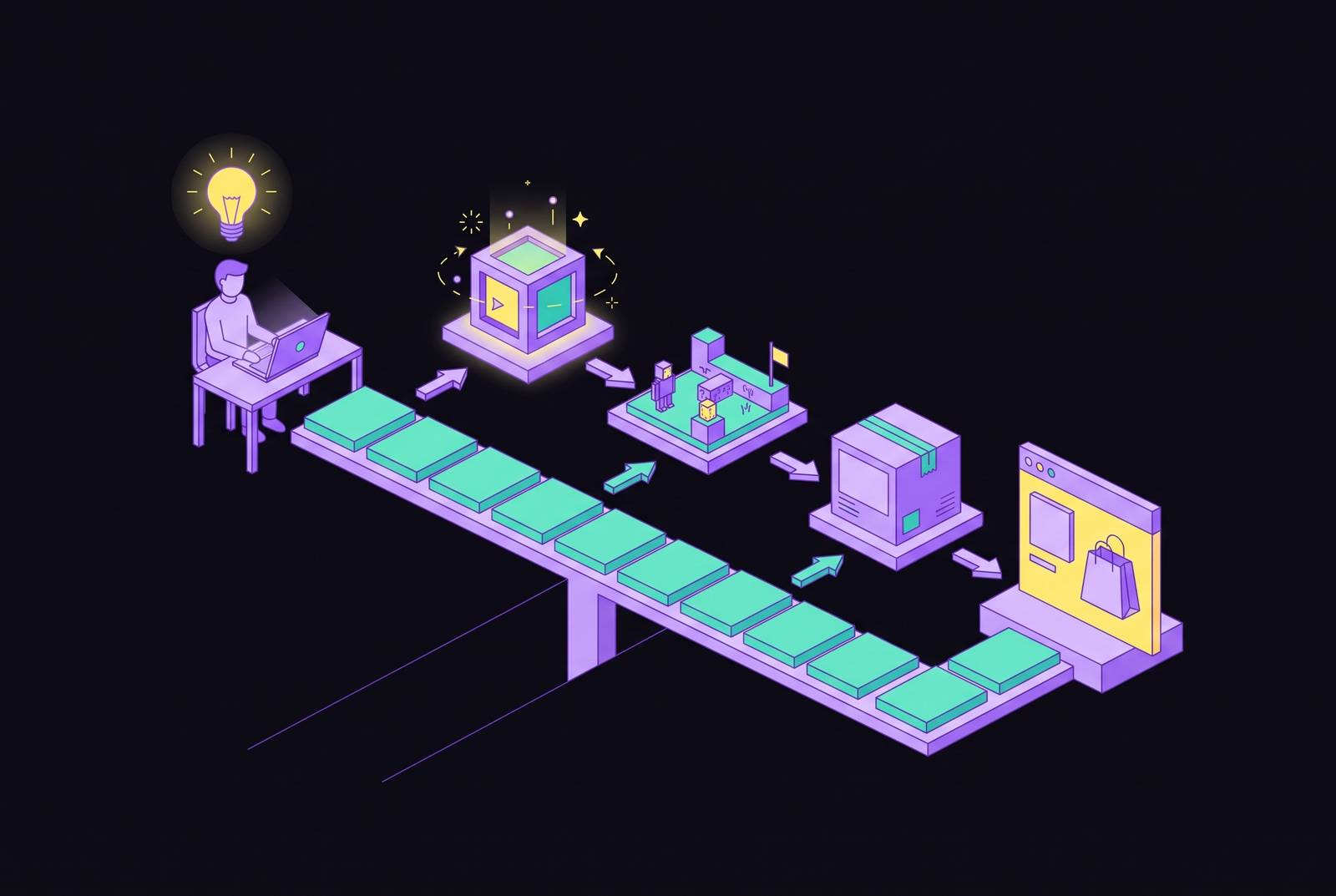
AI-native engines can close the gap between a game idea and a Steam listing by replacing the code-editor hand-off with an AI that understands and changes the project throughout development. For people who cannot code, the useful pipeline is one that connects conversation, working mechanics, assets, runtime correction, and desktop export without requiring them to interpret source files.
Why the code-editor gap still stops most people before they start
A creator opens a traditional editor with a game idea, pastes AI-generated code, and immediately loses the thread. The code needs to go somewhere, connect to something, and behave correctly when the game runs. If it fails, the creator must understand enough of the project to diagnose the failure. The idea was not the obstacle. The obstacle was the moment the tool returned work that required programming knowledge to use.
An AI can write a script while leaving the user to place it, wire a node tree, or connect a signal. That makes code easier to write, but the user still has to understand it. For a non-coder, the hand-off still brings work to a stop. The distinction between AI-assisted and AI-native development begins with whether that hand-off is still part of the workflow.
What "AI-native" actually means in practice, and why architecture is the deciding factor
An AI-native engine has three architectural properties that address this problem together. First, the AI can read the actual editor state and act on it, including the scene tree that organises the game’s objects. A request to add a player with a following camera therefore becomes a change to the project. The AI works on the game itself. This is the first test of whether conversation is the primary interface or merely an aid to using another interface.
Second, context is continuous. When the creator asks for faster enemies, the AI knows which objects are enemies, their current speed, and the property that needs changing. The creator does not have to reconstruct the project in every request. Without continuous context, the user has to explain how the project is put together before the conversation can move on.
Third, the AI can read the running game’s diagnostics and use them to correct mistakes. This connects implementation to its actual result rather than leaving the assistant to reason only from text. Together, these properties distinguish an AI-native engine from a better chatbot wrapper. A wrapper can produce increasingly persuasive instructions while still leaving their execution to the user. An engine-connected agent can look at and change the state those instructions refer to.
How the current tool landscape actually divides, and what each category can and cannot ship
The first decision is what the creator intends to release. Browser generators turn a prompt into a web page that runs a game, making them suited to playable browser experiences and shared links. Their output is not an engine project. In the browser-generator workflow described here, no engine reports what broke, so there is no way to use engine-informed runtime self-correction. A successful browser demo therefore does not, by itself, establish a path to a desktop release.
If the creator wants to work in a visual editor, event-sheet tools with AI assistance offer a different route. Their AI can create objects, add behaviours, and write events from a request, while the user continues to work in the traditional editor. The editor remains central to the process. These tools are AI-assisted because help is task-specific and context is per-prompt. Their suitability depends on both the intended output and the creator’s willingness to learn that editor.
For a Steam-bound non-coder who wants to remain in conversation, the relevant category is an AI-native engine with desktop export. Real source code exists underneath, but the AI writes and edits it while working with scenes, assets, and runtime diagnostics. This avoids a fixed set of chat-expressible behaviours becoming the project’s limit. The trade-off is practical rather than hidden. It requires a desktop installation, and a first 3D build takes longer than an instant browser demo because it produces a deeper engine project.
What the concept-to-mechanics stage looks like inside an AI-native engine
A request such as “make a platformer with a double jump” gives the concept stage a concrete starting point. The request is intended to produce a playable scene with that core mechanic. The AI works with the engine’s project structure, so the creator does not have to open a script editor. The creator can then test the mechanic in play instead of first learning how its source files fit together.
Subsequent requests develop that scene through instructions such as “add coins the player can collect,” “make the jump feel floatier,” or “add a second enemy type.” Continuous context lets each request extend what already exists. The distinction becomes useful as requests accumulate. A change to jump feel changes the player and movement already in the game, while another enemy type builds on the game’s current structure. The creator can describe those relationships in the language of play.
This stage produces the first meaningful test of the idea. A playable core loop lets the creator see whether the mechanic is fun before building the rest of the game. Browser generators can also succeed at this early stage, so a first playable version is not sufficient evidence of an end-to-end pipeline. An AI-native engine produces a scene tree that subsequent work can build upon.
Where assets come from when you have no art or audio skills
Working mechanics do not resolve the need for art, audio, and animation. Creators without those skills need help making assets, and manual import can bring back the same hand-off that conversation removed from programming. An image or model made outside the project still has to look right inside it. That transition can interrupt development. With integrated asset generation, assets are made and placed within the engine workflow, so the user does not have to import and configure them in a separate process.
The alternative is a layered external stack, using a 2D art tool, a 3D tool, and an audio tool, each with its own licensing tier. Those tools can make what the game needs, but the user has to do more than choose the right visual or sound. Format mismatches, missing material assignments, and import configuration mistakes can require debugging before an asset appears correctly in the scene. Integration removes that category of hand-off.
Licensing adds a separate constraint to that workflow. Steam requires legal rights to all code, artwork, music, and other assets, while free tiers on many asset generators restrict commercial use. Those restrictions can disqualify a game from a Steam listing even when the assets work perfectly. Where an integrated offering provides a single subscription covering commercial use, it simplifies this part of the pipeline as well. That benefit depends on the actual licence.
How iteration and self-correction work when the AI can read the running game
The sharper test comes after the first playable version. AI-generated code can look right and still fail at runtime, leaving a non-coder with an error they do not understand. An assistant that cannot see what broke may save time during generation only to return that cost during debugging. This is where the workflow comes under pressure. The workflow now tests whether AI can help repair the mechanic in the actual project.
An AI-native agent can read diagnostics from the running game and correct its own mistakes using the project’s real state. It is not limited to the creator’s account of an unfamiliar error. Teams that use Godot with external AI tools can use MCP bridges to get access to the real editor state. However, the setup and technical knowledge they require place that workaround outside a genuinely no-code workflow.
Correction is only part of iteration, because a game can run without feeling right. In an AI-native engine, “this doesn’t feel right” is a valid starting point backed by knowledge of the existing project. The creator can describe the desired result instead of locating a file, property, and value before asking for a change. It changes the creator’s role from interpreting implementation errors to judging whether the revised game behaves as intended.
This distinction preserves the value of the earlier stages. Continuous context supports not only adding features but also revising them after play reveals a problem. Without that feedback loop, each new mechanic could leave the user with another technical task to handle. With it, the same conversational workflow remains useful beyond the initial demonstration. The creator still has to assess the game, but does not need to understand a stack trace to participate in fixing it.
What Steam actually requires, and where non-technical creators hit a second wall
A working game is not yet a Steam-ready release. Submission introduces requirements separate from game mechanics, and an AI-native workflow does not remove them. Steam requires joining Steamworks, paying a one-time fee of $100 per game, creating a store page, uploading a working build, passing Valve’s review, and releasing the approved game. The fee is refundable once the game earns a threshold amount in adjusted gross revenue.
Valve requires a 30-day waiting period after the fee is paid, and the Coming Soon page must be public for at least two weeks before release. The process therefore cannot be completed in a weekend. An exportable build may finish the engine’s work, but it does not shorten those waiting periods.
Store assets introduce their own precise requirements. Steam needs at least 5 screenshots, each with a resolution of at least 1920×1080 and a 16:9 aspect ratio. They must show gameplay rather than concept art, awards, or marketing copy, and at least 4 must be suitable for all ages and marked accordingly. The content survey also requires disclosure of any AI-generated content. These obligations sit beside the requirement to hold rights to the game’s code and assets.
For a lower-friction first release or game-jam submission, itch.io offers a different endpoint. It has no submission fee or mandatory waiting period and allows web builds. That makes it compatible with projects whose intended output is a browser game. A real exportable desktop build puts the creator inside the submission process, while browser-only output leaves the project outside that route by default, regardless of its quality.
Why the tool's export architecture determines whether the pipeline completes or stalls at the finish line
The creator therefore needs to check what a tool can export when choosing it, as well as when finishing the game. Mechanics must remain editable, assets must work in the scene and permit commercial use, and runtime problems must remain accessible to correction. The final build must also fit the intended destination. If export fails, the creator can have a finished, playable game with no way to publish it where they had planned.
AI-native design closes the code-editor gap through that continuity. It does not remove the need for a coherent game, valid asset rights, or a complete Steam submission. Nor does it promise an immediate finished release. It gives the non-coder a way to work through those stages without repeatedly becoming the project’s programmer. With an export-capable engine and the publishing requirements understood, the next step is to turn a specific game idea into its first playable mechanic.