Game Engines for Absolute Beginners With No Programming Background
Pick the right engine structure before comparing features and feature lists.
Most beginners pick a game engine the way they'd pick a streaming service: by comparing feature lists. That instinct is backwards. For someone with no programming background, the wrong engine stops them cold at a wall they have no way to climb, leaving no finished game at the end of the process.
The feature list is a distraction. A tool can have physics simulation, multiplayer networking, and a built-in shader editor, and none of that matters if accessing any of it requires writing code the creator doesn't know how to write. The question that actually decides outcomes is structural: does the engine remove the coding barrier, or does it just lower it? An engine that removes the barrier lets a creator describe what they want, watch it get built, play the result, and correct it in plain language. An engine that lowers the barrier still requires the creator to express rules, conditions, and logic, just without typing syntax to do it. Both are legitimate paths, and both can produce a finished game. But they suit different people, and conflating them is how a first-time creator ends up with a tool that fights their instincts for weeks before they give up. Layered on top of that is a second trap that has nothing to do with the engine at all: a beginner who describes an entire game in one sentence, something closer to a design pitch than a prototype, will hit a wall of complexity no tool resolves gracefully, and what's left is a half-built project and no clear next step.
The two real paths available to non-coders in 2026
Three structurally different approaches exist for a creator who doesn't code, and the first task is telling them apart before choosing one.
The first is the visual-logic tool, where rules get assembled from blocks. The second is the browser prompt-to-play generator, which turns a single sentence into a small, instantly playable web game. The third is the AI-native engine, which builds a real project around plain-language instructions inside the engine itself. These are not three flavors of the same thing. They produce different kinds of output, they ask different things of the creator, and treating them as interchangeable is the fastest way to waste a weekend on the wrong one.
The browser generator deserves a clear mention here, mainly so it can be set aside. It's a genuinely useful way to test whether an idea is fun before investing real time in it, since typing a sentence and getting a playable web page back takes seconds. But the output stops at the browser. There's no export to Steam, no opening the result in another engine, no path from that prototype to a shippable product. Treat it as a sketchpad, not a workshop.
That leaves the visual-logic tool and the AI-native engine as the two real paths for building something a creator can finish and release. Neither is superior in the abstract. The right one depends on how the creator wants to work day to day and what kind of game they're aiming to ship, which the next two sections work through in detail.
What the visual-logic path asks of you, and who it suits
Visual-logic tools replace code with structure, not with simplicity. Where a programmer would write a conditional statement checking whether a character is touching the ground before allowing a jump, a visual-logic tool lets the same creator assemble that rule from trigger-and-action blocks, collision layers, and variables set through UI fields. The logic underneath matches what a programmer would write by hand. Only the syntax has been removed. That distinction matters because it sets expectations correctly: this is still programming, in the sense that the creator is still defining triggers, conditions, and consequences by hand. The barrier has been lowered, not removed.
That makes the path a strong fit for a particular kind of mind. Creators who think in systems, who enjoy puzzles, who want to understand precisely why their game behaves the way it does, tend to do well here, because the tool rewards exactly the kind of deliberate, rule-by-rule thinking they already default to. The learning curve is gentler than learning a programming language from scratch, and the payoff is a level of control that comes from building every rule by hand.
The path suits that mind less well when the creator's instincts run toward narrative or feel rather than mechanics. Someone who thinks in terms of "I want it to feel tense when the player opens this door" often finds the trigger-condition-action framework a frustrating translation layer between the idea and the implementation. For that creator, the visual layer doesn't remove friction, it relocates it.
For a 2D beginner committed to this path, the workflow that works is narrow by design. Pick one tiny game concept that can be defined in three lines: what the player does repeatedly, how they win, how a round ends. Build each interaction individually, one rule at a time, such as "when player collides with hazard, lose health," testing after every single change. An AI assistant can still help here even though it can't click buttons inside the engine itself. It can take a vague complaint like "it feels broken" and turn it into an ordered list of things to test, draft dialogue and UI text, and convert a loose idea into a two-week plan with concrete steps. The one rule that shouldn't bend is sticking with one tool through to a finished first game before evaluating alternatives; switching mid-project multiplies the learning curve.
What this path doesn't give a beginner is a free pass on complexity. Physics-heavy games, fully 3D environments, and getting a finished build onto an external platform all ask more of a visual-logic tool than a simple 2D project does, and the ceiling there is lower than it is for an AI-native engine. A beginner whose ambitions point in that direction should understand the next path before committing to this one.
What an AI-native engine does differently, step by step
The distinction between an AI-native engine and a chat-based coding assistant isn't that the AI-native engine can write code the assistant can't. Both can produce working logic. That logic lands in a different place and asks something different of the creator to make it run.
A chat model like the general-purpose assistants many creators already use will write code for a game competently. But it hands that code over as files, and the creator still has to open an editor, create a project, paste the scripts in, fix import paths that don't match, attach nodes manually, and debug why nothing on screen is moving. The assistant did real work. The creator is still doing game development the hard way, just with help reading over their shoulder. An AI-native engine operates differently because it works inside the project itself. It builds the scene, places a character, writes the movement script and attaches it to that character, sets up the physics body and collision shape, binds the input controls, and hands back a build the creator presses play on directly. There's no paste step. There's no wiring step. There's no moment of staring at a script wondering why it isn't attached to anything, because the AI never left the project to write it.
What that looks like in practice follows a pattern. A creator starts from a template close to the genre they're building rather than an empty file, since the foundational systems, movement, collision, camera, already work correctly, and the AI's attention goes toward what makes the specific game distinct. From there, the creator types a plain instruction: "Add a ground platform and three floating platforms at different heights," and level geometry appears in the scene. Another instruction follows: "Put five gold coins above the platforms, and when the player collects all five, show a Level Complete message," and the counter, the win condition, and the UI label all get connected automatically, without the creator touching a single line of logic by hand.
The engine works far better against a build it can already see than against a blank file. That's the reason prompting an entire game into existence in one sentence tends to fail, while prompting a core loop first and expanding from there tends to succeed. Each instruction gives the AI something concrete to reason about and modify, rather than asking it to invent an entire structure from nothing.
The habit that makes this whole process work is simple: change one thing, press play, observe what happened, then change the next thing. When a single change is tested in isolation, a bug has exactly one possible cause. When five changes go in before the creator tests anything, the same bug could be hiding anywhere in that batch, and finding it means re-deriving information the creator could have had for free. That discipline, tested in a build the engine already understands, turns a string of prompts into a working game.
Why scope kills more first games than the engine choice
Choosing the right engine solves half the problem. Deciding how much game to attempt matters just as much, and that decision kills far more first projects than any technical limitation does, regardless of which path a creator chose.
The fix is a discipline, not a warning: before opening any tool, compress the idea into one sentence built from exactly three parts, the player, the action they repeat, and the condition that ends a round. A sentence like "A 2D platformer where I jump between platforms and collect coins, and I fall off the bottom to lose" gives an engine, AI-native or visual-logic, a concrete target to build toward immediately. A sentence like "An open-world RPG with crafting, dialogue, a day-night cycle, and three factions" gives neither the creator nor the AI anything to start from, because there's no single playable loop hiding inside it yet. The first sentence produces a prototype within an hour. The second produces nothing, because there's no "first thing" to build.
Story, art style, menus, sound, and level count all belong outside that first sentence. They matter, but they matter after a running game exists, not before, because an AI-native engine reasons far more effectively about a build it can already see and interact with than about a description of something that doesn't exist yet. Add them once the core loop plays correctly, not before.
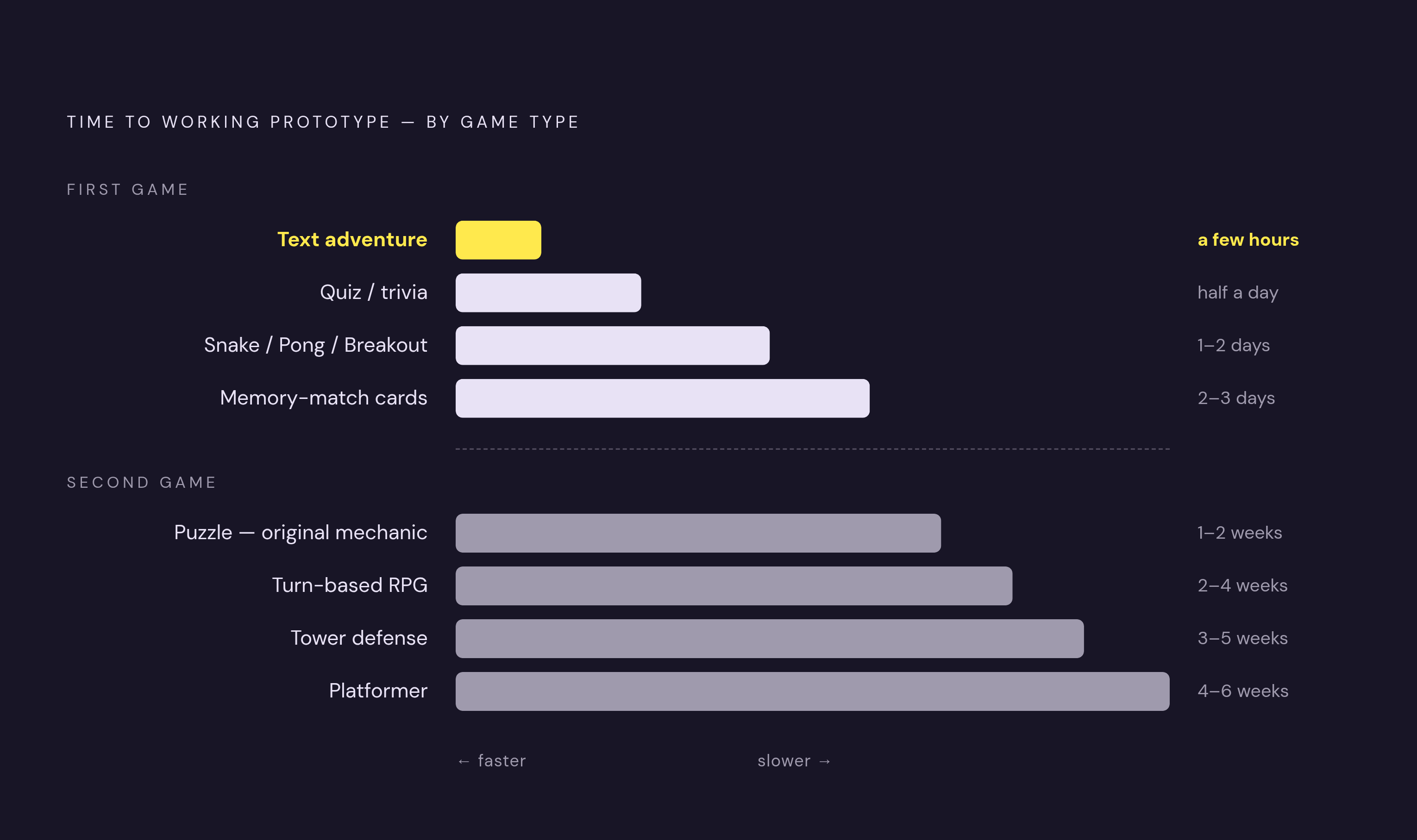
For a complete first-timer, some game types get to playable faster than others. A text adventure or interactive fiction project can have a working version in a few hours, since the AI generates story branches and handles the underlying logic directly. A quiz or trivia game is a simple input-and-output loop, useful mainly for learning how game state gets tracked and updated. A Snake, Pong, or Breakout clone relies on mechanics so well understood that an AI reliably reproduces them. A card game like a memory-match or simple solitaire variant is visual but fundamentally rule-driven, and the AI handles both the interface and the underlying logic without much friction. Once one of those is finished, a platformer with real level design, a tower defense game, a turn-based RPG, or a puzzle game with an original mechanic becomes a reasonable next step, because the creator now has a finished loop behind them to build on.
The rule that follows from all of this is less a warning than a relief: keep the first project's scope small, and finish one loop before starting a second. A short, polished level beats three half-built ones, because the finished one is the proof that the whole process works end to end, and that proof is worth more than three times the unfinished content.
Generating a first game's assets without drawing or composing skills
A playable loop isn't a finished game. It needs art, sound, and music, and a creator with no drawing or composing background has historically had no way to produce any of it. AI closes that gap for all three, but only if the creator makes one decision up front and sticks to it.
Generated art gives a creator a consistent, usable starting point quickly, and art direction is the one place the creator must lead and AI follows. The style itself has to be a human decision, described precisely, with the understanding that the first output is a strong first pass. The mechanism that keeps a game's look from fragmenting into mismatched pieces is a single reusable style prompt applied to every asset, something like "2D game asset, clean silhouette, consistent palette, readable on mobile and desktop," used identically whether the creator is generating a character, a background, or a UI icon. That repetition is what makes characters, environments, and interface elements read as though they belong to the same world instead of looking like they were pulled from three different games. A coherent visual identity across a project is something the creator decides and the AI carries out, not something the AI arrives at on its own.
Sound effects and music follow the same pattern. Describing the feel wanted, a short, punchy coin-collect sound, a low ambient loop for a cave level, is enough for AI to generate usable short loops and one-shot effects suitable for a first game. The workflow that holds all of this together is generating sprites, 3D models, sound effects, and background music by describing them inside the same conversation as the game build itself, then placing the results directly into the scene, without switching between a sequence of disconnected tools to assemble the pieces by hand.
What exporting and publishing means for engine choice
Exporting is the step where the engine choice becomes concrete, determining what a creator can actually do with a finished game. A build that only runs inside the tool that made it is a demo. A build that exports to a native, owned file is a product.
That distinction should shape the engine decision from day one, not get discovered after weeks of work. A creator aiming for a release on Steam or a personal website needs an engine that produces a native build they own outright, not one confined to a browser tab or a platform-specific sandbox. That requirement rules out the browser prompt-to-play generators discussed earlier for anyone with release ambitions beyond testing an idea, since their output never leaves the page it was generated on. It also means asking, before committing to either a visual-logic tool or an AI-native engine, whether that specific tool's export options match the destination in mind.
The practical approach is to work backward from the destination. Decide where the finished game needs to live, a storefront, a personal site, a mobile platform, and let that answer narrow the field before a single prompt gets typed or a single block gets dragged into place. An engine chosen for its prompting experience or its visual logic system still has to clear this bar, because a beautifully built game that cannot leave the tool that built it has not shipped. The coding barrier was never the only wall between an idea and a released game. The export path is the other one, and it rewards the creator who planned for it from the start.
Sources
- How to Make a Game Without Coding (Step by Step, 2026)
- Creating Games Using AI: The Full Workflow (2026)
- Best Game Engine for Beginners (2026): 7 Engines Compared
- No-Code Game Development: The Honest 2026 Guide
- Best No-Code AI Game Makers in 2026 (Honest Roundup)
- Can You Really Make a Game with AI?
- How to Make a Game With AI (Step by Step, 2026)
- AI Game Asset Generator